How Google Discovers New URLs
Publishing a page does not automatically mean Google knows that it exists. Before Google can crawl, understand, or index a page, its systems normally need to discover the page’s URL.
Google calls this URL discovery. According to Google’s documentation, new URLs are commonly found through links on pages Google already knows and through submitted sitemaps. Googlebot can then place discovered URLs into its crawling process, but discovery alone does not guarantee that a URL will be crawled, indexed, or shown in search results. (developers.google.com)
Direct Answer
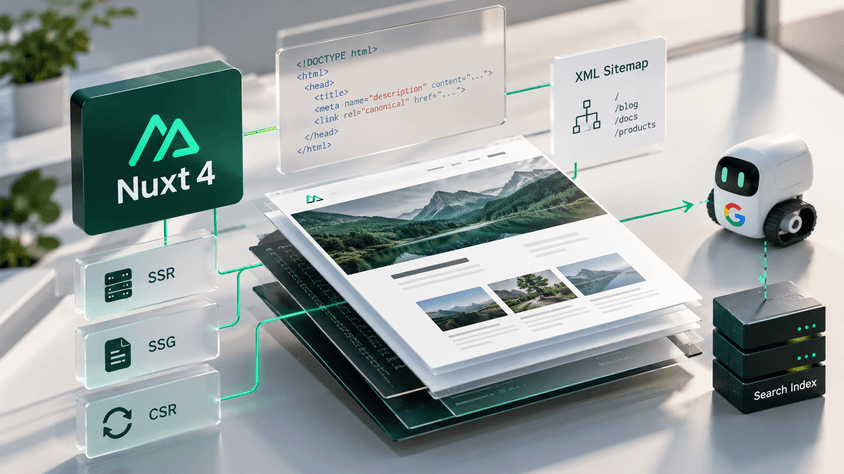
Google primarily discovers new URLs by following links from previously discovered pages and by reading sitemaps provided by website owners. Googlebot can also encounter URLs while processing redirects and links generated by JavaScript when those links are implemented in a crawlable way. (developers.google.com)
The important distinction is:
Discovery → Crawling → Indexing → Serving
These are separate stages. A discovered URL is only a URL Google knows about. It is not automatically an indexed page.
Key Facts
| Mechanism | Can help Google discover a URL? | Important limitation |
|---|---|---|
| Internal links | Yes | The link should be crawlable |
| External links | Yes | Google must encounter the linking page |
| XML sitemap | Yes | A sitemap is a hint, not a guarantee |
| RSS/Atom feed | Yes | Usually covers recent content |
| Redirect | Yes | Googlebot may encounter the destination while navigating URLs |
| JavaScript-generated link | Yes | It should ultimately produce a crawlable <a href> link |
| Search Console request | Yes, for URLs you manage | Requesting crawling does not guarantee indexing |
Google explicitly says that it does not maintain a central registry containing every web page. Its crawlers continuously discover new and updated URLs across the web instead. (developers.google.com)
Links Are the Main Discovery Path
Googlebot discovers new URLs primarily from links embedded in pages that Google already knows about. Google’s documentation describes a simple example: a category or hub page links to a newly published blog post, allowing Google to discover that new URL. (developers.google.com)
The same principle applies both internally and externally.
An internal link points from one page on your site to another:
<a href="/guides/technical-seo">Technical SEO Guide</a>
An external link from another website can expose your URL through the same general crawling process.
For important pages, Google recommends making sure each page has a link from at least one other page on your site. (developers.google.com)
This is why site architecture matters for discovery. A page may exist perfectly well on your server but remain difficult for Google to find if nothing Google can crawl points to it.
Pages with no meaningful internal links are commonly called orphan pages.
INTERNAL LINK: Internal Linking for SEO
Links Must Be Crawlable
Not every clickable interface element is necessarily a link Google can reliably extract.
Google says the safest structure is an HTML <a> element with an href attribute:
<a href="/services/seo">SEO Services</a>
Patterns based only on JavaScript event handlers are less reliable:
<span onclick="openPage('/services/seo')">SEO Services</span>
Google can execute JavaScript, and JavaScript can insert links into the rendered DOM. However, Google still recommends implementing those links according to its crawlable-link guidance. (developers.google.com)
For JavaScript-heavy applications, every piece of content intended to appear as a separate search result should also have its own URL. (developers.google.com)
INTERNAL LINK: JavaScript SEO Explained
Sitemaps Help Google Find URLs
A sitemap gives Google a structured list of URLs you consider important.
For example:
<url>
  <loc>https://example.com/blog/new-article</loc>
  <lastmod>2026-09-20</lastmod>
</url>
Google describes sitemaps as an important discovery mechanism, particularly for large websites, recently launched sites, sites with few external links, and sites containing specialized media or news content. (developers.google.com)
A sitemap is especially useful when a page is not likely to be discovered quickly through normal link crawling.
However, submitting a sitemap does not mean:
“Google must crawl and index every URL listed here.”
Google explicitly describes sitemap submission as a hint. It does not guarantee that Google will download, crawl, or index every submitted URL. (developers.google.com)
Sitemaps should therefore complement good internal linking rather than replace it.
INTERNAL LINK: XML Sitemaps Explained
Discovery Is Not Crawling
This distinction causes a large amount of SEO confusion.
Suppose Google finds:
https://example.com/new-page
through an internal link.
At this point Google may know the URL exists. That is discovery.
Googlebot may later fetch the URL. That is crawling.
Google may then analyze the content and decide whether and how to store it in its search index. That is indexing. (developers.google.com)
A simplified flow looks like this:
URL discovered
      ↓
Added to crawling process
      ↓
Googlebot fetches the URL
      ↓
Content is processed/rendered
      ↓
Google evaluates it for indexing
Not every URL moves through every step.
Google explicitly states that following its technical requirements does not guarantee crawling, indexing, or appearance in Search. (developers.google.com)
robots.txt Does Not Hide a URL
A common misconception is that blocking a URL in robots.txt prevents Google from discovering it.
That is not necessarily true.
If another page links to the blocked URL, Google may still learn that the URL exists. A robots.txt rule prevents the specified crawler from fetching the blocked resource; it does not necessarily erase knowledge of the URL.
Google notes that a blocked URL may even appear in search results without a snippet because Google cannot crawl its content. (developers.google.com)
If your goal is to prevent indexing, Google recommends using noindex while allowing the crawler to access the page so it can see that directive. (developers.google.com)
INTERNAL LINK: robots.txt Explained
What About nofollow?
A link using:
<a href="/private-page" rel="nofollow">Page</a>
generally tells Google not to follow that particular link.
However, this does not guarantee that the destination URL remains undiscovered. Google may find the same URL through another internal link, another website, or a sitemap. (developers.google.com)
Discovery is therefore best understood as a web-wide process rather than something controlled by a single link.
Search Console and URL Submission
For a small number of pages you manage, Google Search Console's URL Inspection tool can be used to request crawling.
For larger groups of URLs, Google recommends using a sitemap. (developers.google.com)
Repeatedly requesting indexing does not make Google crawl the same URL faster, and a crawl request does not guarantee inclusion in search results. (developers.google.com)
Another common misconception involves Google's Indexing API. It is not a general-purpose API for submitting ordinary pages. Google currently documents it for pages containing JobPosting or livestream BroadcastEvent content embedded in VideoObject. (developers.google.com)
Improve URL Discovery
For most websites, the practical approach is straightforward:
- Give every important page a permanent, crawlable URL.
- Link to new pages from existing relevant pages.
- Use normal
<a href>links. - Keep important pages reachable through your site architecture.
- Maintain an accurate sitemap containing URLs you want Google to find.
- Update meaningful
<lastmod>values when content actually changes. - Avoid accidentally blocking required pages or resources.
- Use Search Console to diagnose important URLs that are not being discovered or crawled.
Google also warns that discovery may be slower if important links available on desktop are missing from the mobile version of a site, because Google indexes the mobile version of pages. (developers.google.com)
SeoNest Recommendation
Treat internal links as the primary discovery architecture and sitemaps as a complementary discovery signal.
A new page should ideally be discoverable naturally from another useful page rather than existing only inside a sitemap. For large or frequently updated websites, automate sitemap generation and ensure newly published canonical URLs enter the sitemap promptly.
If an important page is not appearing in Google, diagnose the stages separately:
Does Google know the URL?
        ↓
Can Google crawl it?
        ↓
Can Google render the content?
        ↓
Is it eligible for indexing?
        ↓
Did Google choose to index it?
Trying to solve an indexing problem by repeatedly submitting the URL will not help if the underlying problem is actually site architecture, crawlability, rendering, duplication, or content quality.
FAQ
How long does Google take to discover a new URL?
There is no guaranteed discovery time. Google says crawling after a request can take from a few days to a few weeks, and its crawling schedule is algorithmic. (developers.google.com)
Does Google need a sitemap to discover pages?
No. If your pages are properly linked, Google can usually discover most of them through links. Sitemaps become particularly useful for large, new, complex, or media-heavy sites. (developers.google.com)
Can Google discover a page with no internal links?
Potentially. It might discover the URL through an external link, sitemap, or another source. But relying on that is poor site architecture for an important page.
Does sitemap submission guarantee indexing?
No. Google explicitly says sitemap submission is a hint and does not guarantee crawling or indexing. (developers.google.com)
Does robots.txt stop URL discovery?
Not necessarily. Google may know a blocked URL from links or other discovery mechanisms even when it cannot crawl the page. (developers.google.com)
Final Takeaway
Google cannot crawl a page it does not know exists.
New URLs are primarily discovered as Googlebot follows crawlable links across the web and processes sitemaps provided by site owners. Once discovered, a URL enters a separate process in which Google decides whether and when to crawl it, then whether the resulting content should be indexed.
For SEO, the practical lesson is simple: publish URLs into a discoverable web structure, not merely onto a server.
Sources
- Google Search Central — In-depth guide to how Google Search works. (developers.google.com) Google documentation
- Google Search Central — Link best practices for Google. (developers.google.com) Google documentation
- Google Search Central — Learn about sitemaps. (developers.google.com) Google documentation
- Google Search Central — Build and submit a sitemap. (developers.google.com) Google documentation
- Google Search Central — Ask Google to recrawl your URLs. (developers.google.com) Google documentation
- Google Search Central — Understand JavaScript SEO basics. (developers.google.com) Google documentation
- Google Crawling Infrastructure — How Google interprets the robots.txt specification. (developers.google.com) Google documentation
- Google Search Central — Using the Indexing API. (developers.google.com) Google documentation