Frontend Observability: Errors, Web Vitals, Network, and Sessions
A page can return 200 OK while a real user sees a broken checkout button, a four-second content load, a failed API request, or a layout that jumps just before they click. Server monitoring alone cannot see all of this because much of the application now executes inside the browser.
Frontend observability fills that gap. It collects evidence from real browser sessions so engineers can answer not only “Is the site running?” but also “What did this user experience, and why?”
The most useful frontend observability systems connect four kinds of evidence: JavaScript errors, Web Vitals, network activity, and session context.
Direct Answer
Frontend observability is the practice of instrumenting a website or web application so its real behavior inside users' browsers can be understood from telemetry. Observability generally relies on outputs such as logs, metrics, and traces; on the frontend, this expands naturally into browser errors, user-experience metrics, resource timing, route changes, and session-level context. (opentelemetry.io)
The goal is not to collect everything. The goal is to connect enough evidence to move from symptom → affected session → technical cause → verified fix.
Four Signals That Matter
| Signal | Main question | Typical evidence |
|---|---|---|
| Errors | What broke? | Exception, stack trace, route, release |
| Web Vitals | What felt slow or unstable? | LCP, INP, CLS |
| Network | Which request or resource caused delay? | DNS, connection, request, response timing |
| Sessions | What happened around the problem? | Route, actions, errors, requests, optional replay |
Individually, each signal is useful. Together, they become far more diagnostic.
An INP value of 620 ms tells you that an interaction was slow. An error says a function failed. A request lasting three seconds says the network path was expensive. But if all three belong to the same session and interaction, the investigation becomes much more precise.
Error Visibility
Browser consoles are useful during development, but production failures happen on devices you do not control. Frontend error monitoring therefore starts by capturing failures and attaching useful context.
Browsers expose an error event for synchronous script failures and an unhandledrejection event when a Promise is rejected without a rejection handler. MDN also notes that cross-origin restrictions can limit some unhandled-rejection reporting. (developer.mozilla.org)
A minimal implementation might look like this:
window.addEventListener('error', (event) => {
    reportError({
        type: 'error',
        message: event.message,
        file: event.filename,
        line: event.lineno,
        column: event.colno,
        stack: event.error?.stack,
    });
});

window.addEventListener('unhandledrejection', (event) => {
    reportError({
        type: 'unhandledrejection',
        message: String(event.reason),
        stack: event.reason?.stack,
    });
});
In production, the error itself is only the beginning. Useful records normally include the application release, route, browser, environment and a session identifier. Errors should also be grouped so one defect affecting 50,000 users does not appear as 50,000 unrelated incidents.
Minified production bundles introduce another problem: a stack trace may point to something like app.8f72d.js:1:48217. Source maps map generated code back to original JavaScript, WebAssembly, or CSS sources. Their format is standardized by ECMA-426, whose first edition was published in December 2024. (ecma-international.org)
INTERNAL LINK: JavaScript Source Maps Explained
Real-User Web Vitals
Errors tell you when software fails. Performance telemetry tells you when software technically works but delivers a poor experience.
The current Core Web Vitals are:
- Largest Contentful Paint (LCP): loading performance.
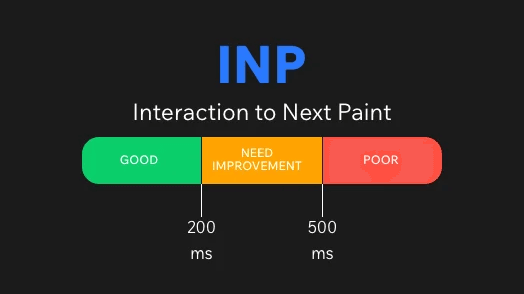
- Interaction to Next Paint (INP): responsiveness.
- Cumulative Layout Shift (CLS): visual stability.
Google's documented “good” thresholds are LCP ≤ 2.5 seconds, INP ≤ 200 milliseconds, and CLS ≤ 0.1. These should be evaluated at the 75th percentile of page visits, with mobile and desktop considered separately. (web.dev)
That percentile matters. An average can make a site look healthy while a meaningful portion of users consistently receive a poor experience.
For production monitoring, Google's web-vitals library provides an easier way to collect measurements consistent with the Web Vitals methodology. Google also provides an attribution build that adds diagnostic context for investigating poor measurements. (web.dev)
import { onCLS, onINP, onLCP } from 'web-vitals/attribution';

function report(metric) {
    navigator.sendBeacon('/rum', JSON.stringify(metric));
}

onLCP(report);
onINP(report);
onCLS(report);
The important distinction is field versus lab data. Lighthouse and local profiling help reproduce and investigate problems under controlled conditions. Real User Monitoring, or RUM, shows what actually happened across real devices, networks and sessions. Google explicitly recommends using field measurements when assessing real-user Web Vitals. (web.dev)
INTERNAL LINK: Core Web Vitals Explained
Network Observability
A slow frontend is not always a JavaScript problem. The browser may be waiting for DNS resolution, a connection, server processing, an image, a third-party script, or an API response.
The Resource Timing API exposes detailed resource-loading information. The current W3C Resource Timing draft defines PerformanceResourceTiming, including timestamps and metadata around fetching page resources. (w3.org)
Browsers expose these entries through the Performance Timeline and PerformanceObserver. (w3.org)
const observer = new PerformanceObserver((list) => {
    for (const entry of list.getEntries()) {
        reportNetwork({
            url: entry.name,
            type: entry.initiatorType,
            duration: entry.duration,
            requestStart: entry.requestStart,
            responseStart: entry.responseStart,
            responseEnd: entry.responseEnd,
            transferSize: entry.transferSize,
        });
    }
});

observer.observe({
    type: 'resource',
    buffered: true,
});
PerformanceResourceTiming can expose phases such as DNS lookup, connection setup, request start, response start and response end, making it possible to distinguish different classes of delay. (developer.mozilla.org)
There is an important limitation: detailed timing for cross-origin resources is restricted by default. A third-party resource must explicitly expose timing information using the Timing-Allow-Origin response header. (w3.org)
This prevents a common diagnostic mistake. Seeing that analytics.example.com/script.js took two seconds does not automatically tell you whether two seconds came from DNS, connection establishment, server response time or downloading the body. Your available evidence depends on browser security rules and server configuration.
Session Context
The fourth signal answers a different question: what was happening when the problem occurred?
Consider an error called Cannot read properties of undefined. Without context, an engineer may need to reproduce it manually.
Now attach:
Release: 2026.09.25-4
Route: /checkout/payment
Session: a8f2...
Previous action: Click "Pay"
API: POST /payments → 500
INP: 684 ms
Error: PaymentForm.submit
The incident now tells a story.
Session context does not necessarily mean recording every user action. Start with lightweight metadata: session ID, route, navigation sequence, release, relevant actions, errors, performance measurements and request correlation.
Session replay can provide additional visual context, but it introduces significant privacy responsibilities. Implementations are vendor-specific rather than a browser observability standard. For example, Datadog documents masking controls for Session Replay and notes that masked values can be prevented from leaving the user's device. (docs.datadoghq.com)
The practical rule is simple: collect the minimum information required to diagnose the problem. Mask form values and sensitive DOM content, avoid passwords and authentication tokens entirely, apply sampling, and define retention intentionally.
Correlate the Signals
The largest improvement in frontend observability usually comes from correlation rather than collecting another metric.
Suppose customers report that product pages occasionally feel frozen.
A useful investigation could follow this chain:
Symptom: “Add to Cart” reacts slowly. Measurement: Sessions with poor INP are identified. Possible cause: A long client-side task or expensive application logic. Confirmation: INP attribution identifies the affected interaction; the same sessions show a specific JavaScript execution path. Fix: Reduce or split blocking work. Re-measurement: Compare the INP distribution after the new release.
Another incident may begin with a high LCP, then lead to a slow image request in Resource Timing, and finally to an origin or CDN configuration issue.
Observability works when engineers can move between these signals without manually reconstructing the event from unrelated dashboards.
Common Mistakes
Tracking only averages. Performance distributions matter. A median can hide a poor experience affecting a significant minority of users.
Collecting errors without release information. You need to know which deployment introduced or fixed the problem.
Measuring Web Vitals without attribution. Knowing that INP is 600 ms is less useful than knowing which interaction produced it.
Logging every network request forever. High-volume telemetry increases storage, cost and privacy exposure. Sample intelligently and retain diagnostic fields rather than indiscriminate payloads.
Treating session replay as observability by itself. Watching a broken session can show what happened, but errors, timings and request correlation are what explain why.
Assuming browser telemetry is unrestricted. Cross-origin policies, browser support and API limitations affect what can be observed.
SeoNest Recommendation
Build frontend observability progressively.
Start with production error reporting and release tracking. Add real-user LCP, INP and CLS. Then collect network timing for the requests and resources that matter to your application. Finally, correlate those signals through a privacy-safe session identifier and add sampled session replay only where it provides additional diagnostic value.
The target architecture should let an engineer begin with a business symptom—“checkout failures increased” or “mobile product pages became slow”—and trace it toward technical evidence without guessing.
OpenTelemetry can help standardize traces, metrics and logs across systems, but browser instrumentation deserves special evaluation: the OpenTelemetry JavaScript documentation currently describes client-side browser instrumentation as experimental and mostly unspecified. (opentelemetry.io)
FAQ
Is frontend observability the same as monitoring?
Not exactly. Monitoring usually answers predefined questions such as whether error rate or LCP exceeded a threshold. Observability is broader: the collected telemetry should also help investigate failures you did not anticipate in advance.
Should every session be recorded?
Usually not. Errors and lightweight RUM signals can often be collected much more broadly, while session replay can be sampled because of storage, cost and privacy considerations.
Are Core Web Vitals enough?
No. They describe important aspects of user experience, but they do not explain every failure. Web Vitals become more useful when correlated with errors, resources, application actions and release information.
Should I build my own observability platform?
Usually, start with standard browser APIs and a proven telemetry backend. Build custom collection only where your requirements justify the engineering and operational cost.
Final Takeaway
Frontend observability is not a dashboard full of browser metrics. It is a connected evidence system.
Errors tell you what broke. Web Vitals tell you what users felt. Network telemetry helps reveal where time was spent. Session context tells you what surrounded the failure.
When those signals share enough context, production debugging changes from trying to reproduce vague reports into investigating concrete evidence from the browser where the problem actually happened.
Sources
- OpenTelemetry — What is OpenTelemetry? Current documentation. OpenTelemetry documentation
- OpenTelemetry — Observability Primer. Current documentation. Observability Primer
- Google / web.dev — Web Vitals. Web Vitals
- Google / web.dev — Getting Started with Measuring Web Vitals. Web Vitals measurement guide
- GoogleChrome — web-vitals library documentation. web-vitals repository and documentation
- W3C Web Performance Working Group — Resource Timing, Candidate Recommendation Draft, September 1, 2026. W3C Resource Timing specification
- MDN Web Docs — Window: error event, updated August 21, 2026. MDN error event documentation
- MDN Web Docs — PerformanceResourceTiming. MDN PerformanceResourceTiming documentation
- Ecma International — ECMA-426: Source map format specification, 1st edition, December 2024. ECMA-426
- Datadog — Reducing Data Related Risks / RUM & Session Replay. Datadog data security documentation